
Monitoring & System Response FMEA

FMEA-MSR SOFTWARE

Streamline FMEA Monitoring and System Response (FMEA-MSR) analysis with Relyence FMEA-MSR software. Built to AIAG & VDA standards, it enhances reliability, supports collaboration, and maintains control over your safety-critical systems.

Start Your FMEA-MSR Trial Today

FMEA-MSR Made Easy

Relyence FMEA-MSR Software

Relyence FMEA-MSR software provides a structured approach to Monitoring and System Response analysis in line with AIAG & VDA FMEA guidelines. Designed for engineers working on safety-critical systems, it ensures risks are captured, monitored, and mitigated with confidence. With web-based access, built-in workflows, Knowledge Banks, dashboards, and full traceability through Audit Trails and Revisions, Relyence offers a reliable, modern platform for teams. Whether upgrading from spreadsheets or integrating with DFMEA, PFMEA, or FRACAS, Relyence keeps your risk management aligned and effective.


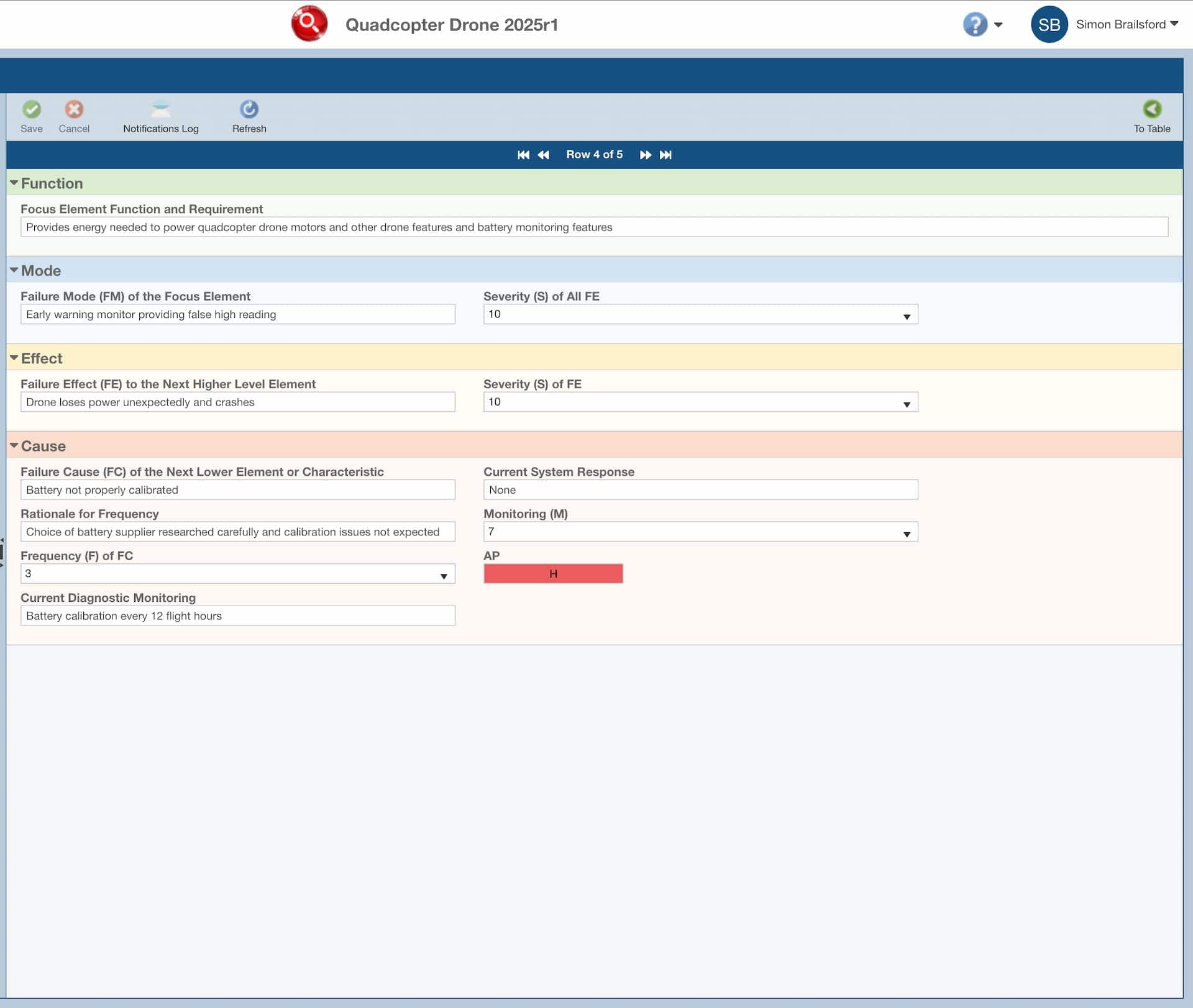
image shows fmea-msr data for a single cause on the Relyence form view

What People Are Saying About Our FMEA-MSR Software

Reed W, The Marsden Group

That’s one of the big reasons why I chose Relyence, because you all are responsive to what the customer wants.

Peter S.

We’re really impressed with the FTA capabilities and the API integration that’s already available.

Jim L, Bionetics

10/10!

FMEA Monitoring and System Response (FMEA-MSR) is a crucial step in ensuring systems respond effectively when failures occur.

Relyence FMEA-MSR software simplifies this process, guiding you through AIAG & VDA-compliant workflows that help you define, track, and evaluate detection and response measures. With Knowledge Banks and SmartSuggest to capture lessons learned, collaboration tools to engage your teams, and dashboards to monitor effectiveness, you gain clarity and control. Integration with DFMEA, PFMEA, FTA, and FRACAS ensures seamless risk management across the lifecycle. Easy migration from Excel means you can modernise without disruption.

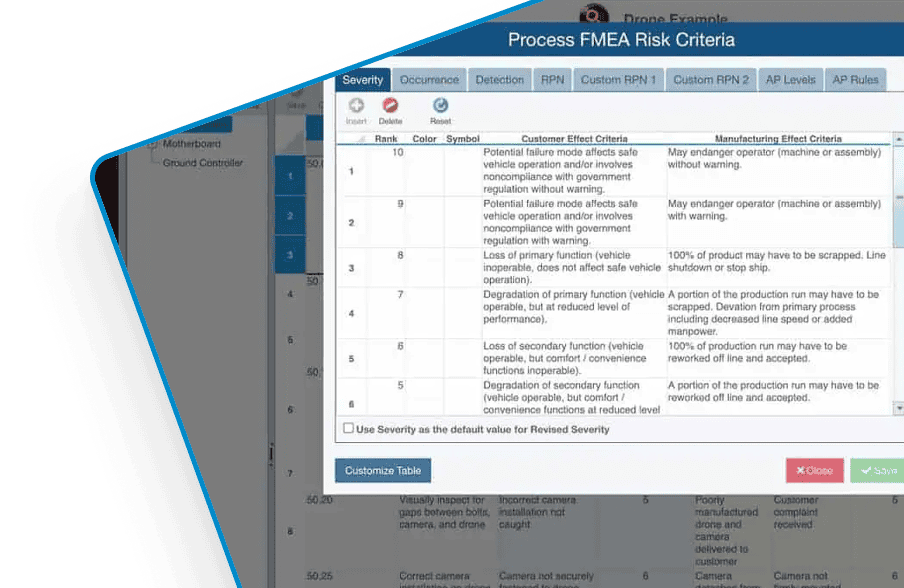
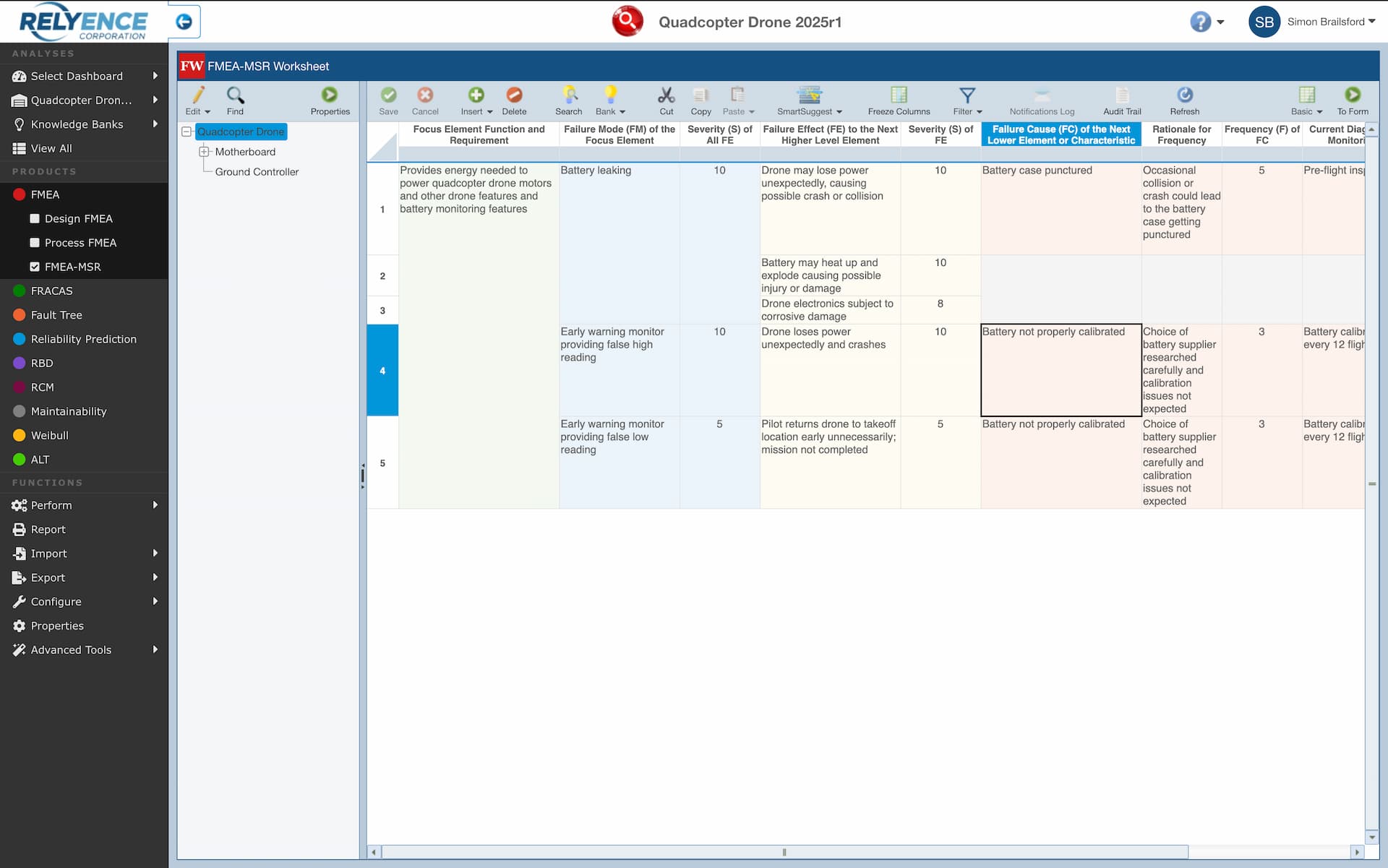
Image shows Relyence FMEA software with the FMEA-MSR activated.

Multiple FMEA-MSR types supported

Relyence FMEA-MSR key features

In addition to platform-wide capabilities, each Relyence module offers unique features developed for its specific analysis method. These specialist tools ensure engineers have the right functionality at the right time, helping achieve reliable, audit-ready results with less effort.

Relyence FMEA-MSR offers users the following benefits…

Failure Direct Connect

Relyence Failure Direct Connect: Bridging FRACAS and FMEA for Continuous Improvement

Relyence Failure Direct Connect seamlessly integrates your DFMEAs, PFMEAs & FMECAs with your FRACAS data, providing valuable insights into the failure mechanism. By linking real-world failure data directly to your FMEA, Relyence closes the loop between your warranty returns and future design iterations.

One standout feature is the ability for users to suggest FMEA updates directly from FRACAS entries. This ensures that new issues are promptly incorporated into your FMEA, keeping your analysis current and comprehensive. The result? Enhanced collaboration, faster response times, and a powerful feedback loop that drives ongoing product reliability improvements.
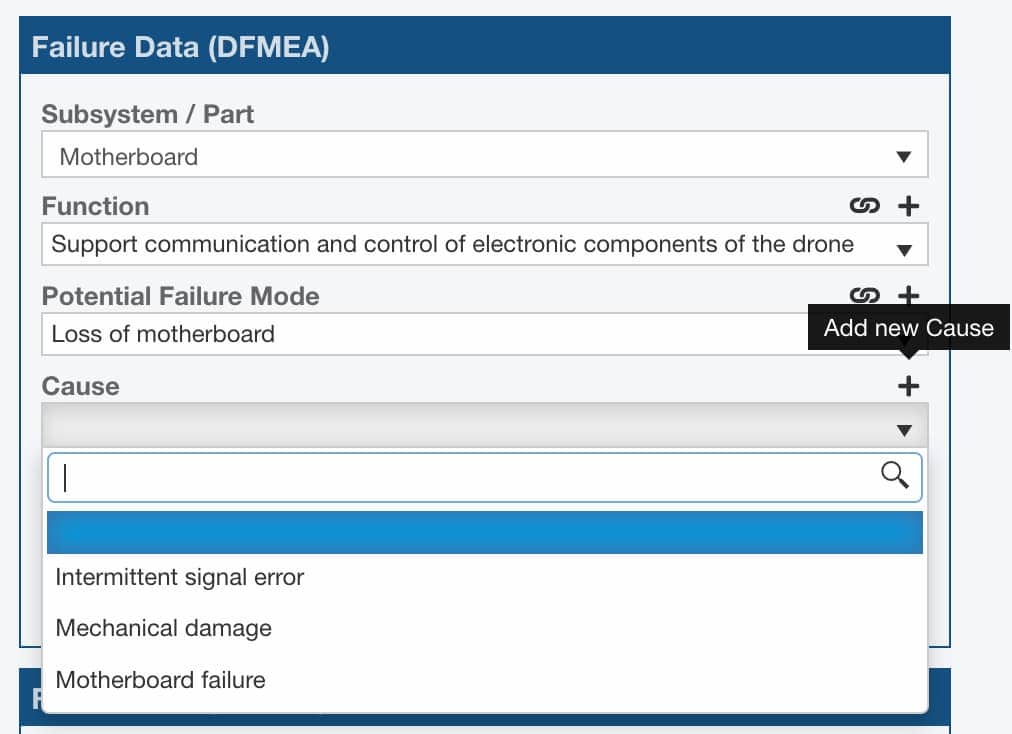
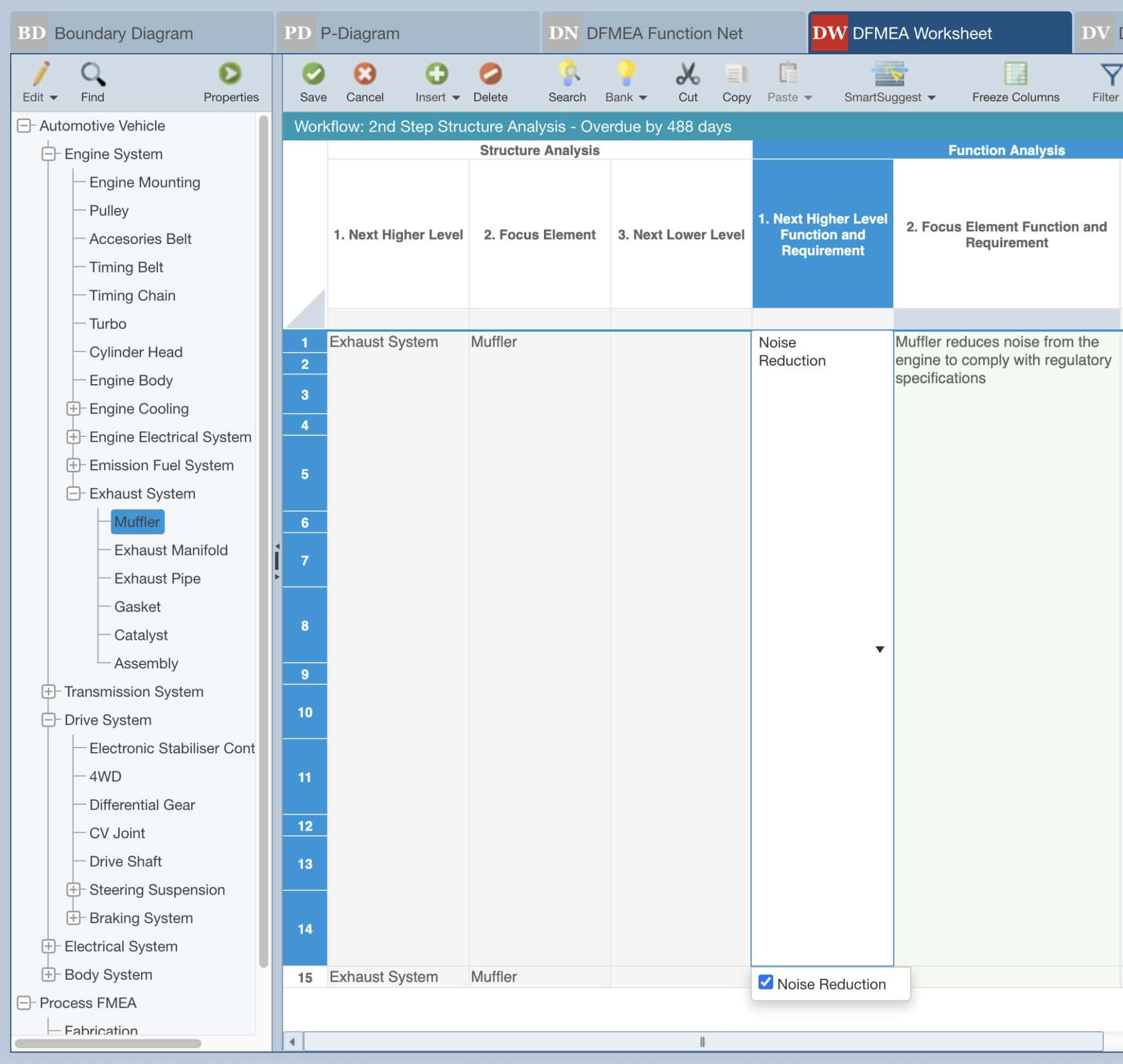
Screen shows how Relyence FRACAS can display your FMEA data, relevant to your selected subsystem, function or process step. Failure Direct Connect allows your users to correctly categorise failures based on the FMEA data and where necessary feedback suggestions where data is missing or incorrect.

AIAG & VDA FMEA Template Support

For teams following specific industry standards, such as AIAG & VDA for automotive, Relyence offers updated templates and reports aligned with these guidelines, simplifying compliance.

AIAG & VDA FMEA Template Support

Customisable Workflow & Approvals

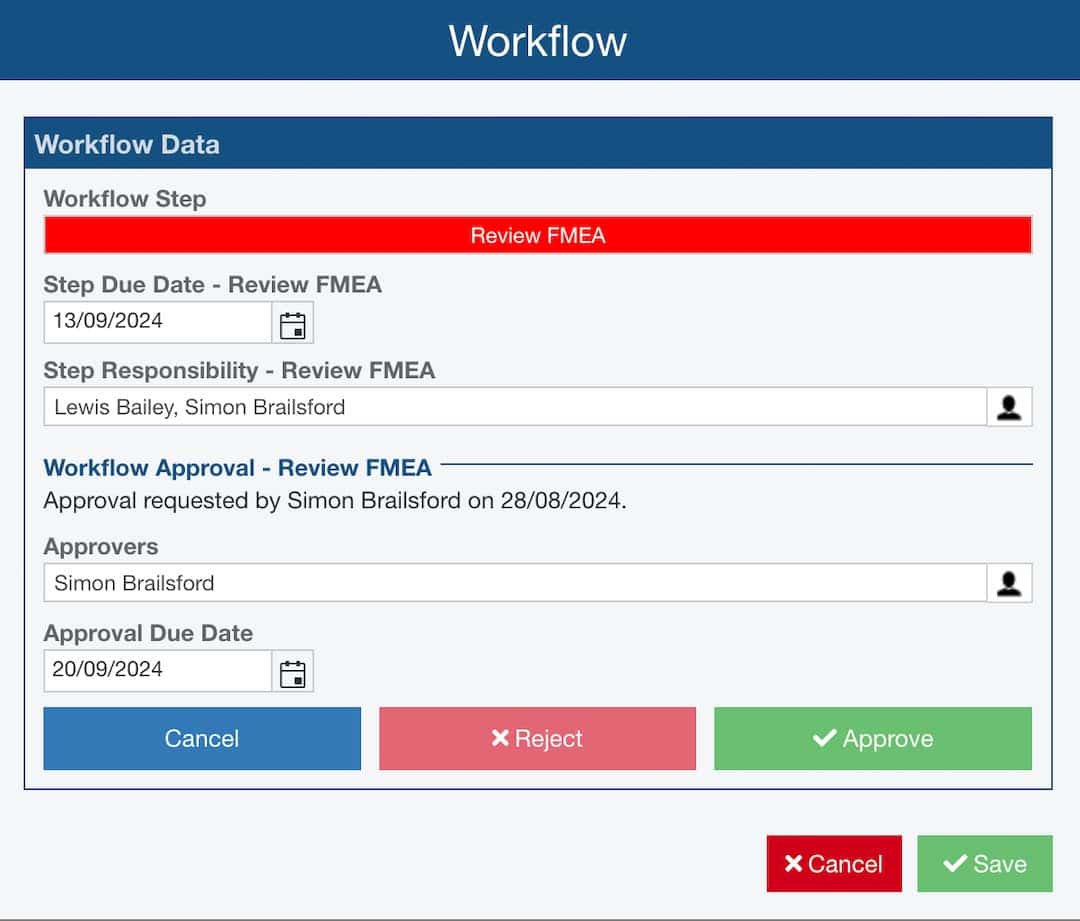
Relyence FMEA and FRACAS empower you to take full control of your processes with customisable Workflows, Approvals, and Notifications. Designed to manage every step from start to finish, our intuitive Workflow Editor lets you tailor processes to your team structure and specific requirements. Configure everything with ease—from workflow steps and approval settings to automated notification messages and schedules.

Keep your team aligned and informed with a system that ensures seamless collaboration and accountability. Notifications prompt action at key stages, while approval mechanisms ensure compliance and precision. With Relyence, your workflows are as agile and efficient as your projects demand, giving you the flexibility to adapt and thrive in any industry.

Screenshot showing a customisable workflow, with optional approvals.

Knowledge Banks

Control Your FMEAs with Relyence Knowledge Banks

Relyence Knowledge Banks streamline your FMEA process by providing a centralised repository for all your approved FMEA data, failure modes, effects, causes, and corrective actions. Engineers can search this data to quickly access proven solutions, saving time and ensuring consistency across projects.

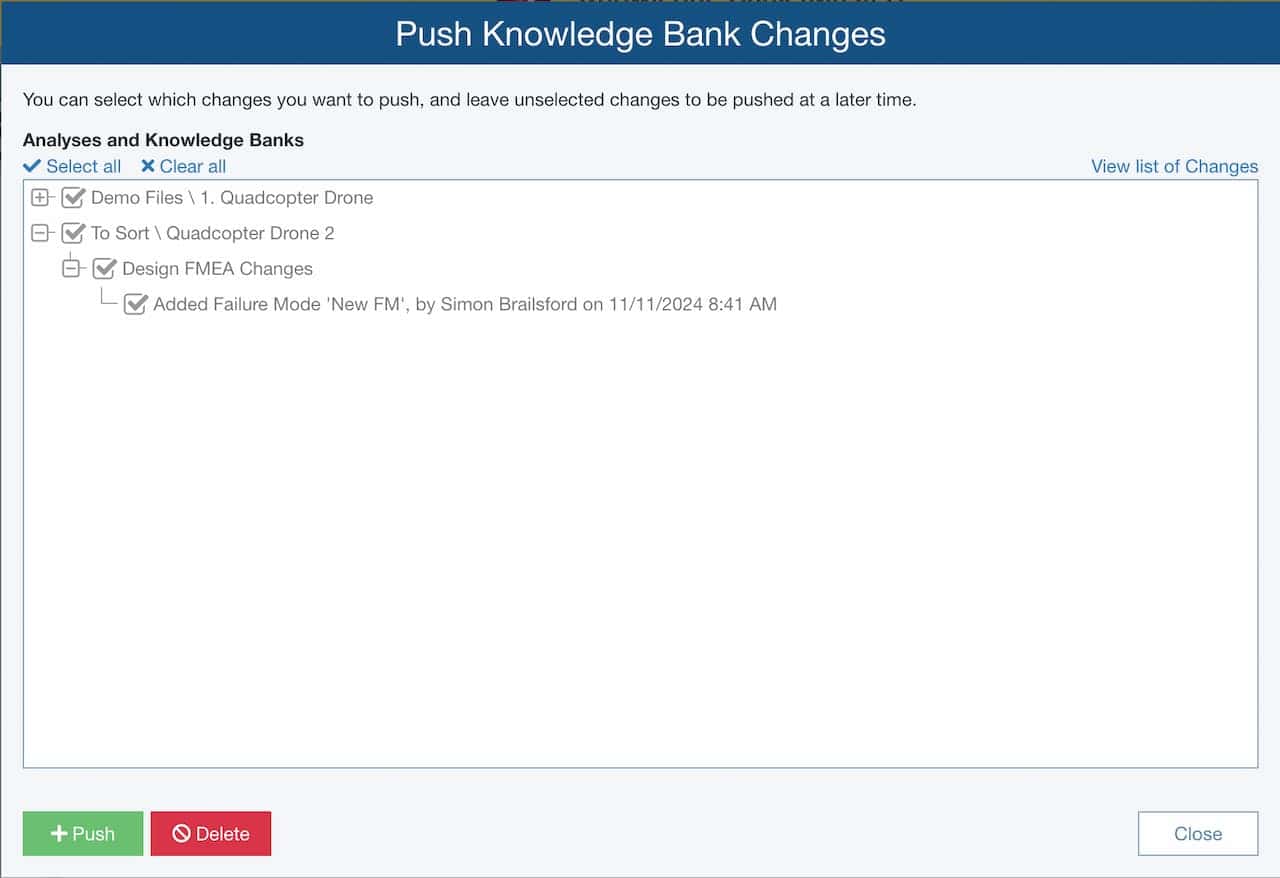
The push feature allows you to effortlessly update your analyses with the latest information, keeping your analyses aligned and compliant. Plus, with built-in usage tracking, you gain visibility into how often and where your Knowledge Banks data is being applied, helping to identify best practices and areas for improvement. It’s a smarter, more efficient way to drive your risk analysis.

screen shows a pop up dialogue from the Relyence Knowledge bank, where the user is able to select which updates they want to push out and to which analysis files.

Relyence FMEA-MSR Core Features

As part of the fully integrated Relyence platform, the FMEA-MSR module benefits from a wide range of shared features. These cross-module capabilities allow engineers to save time, avoid duplication, and ensure analyses remain accurate and consistent across projects. Many of the features most valued by our customers are built-in here — visit the features section for the full breakdown.

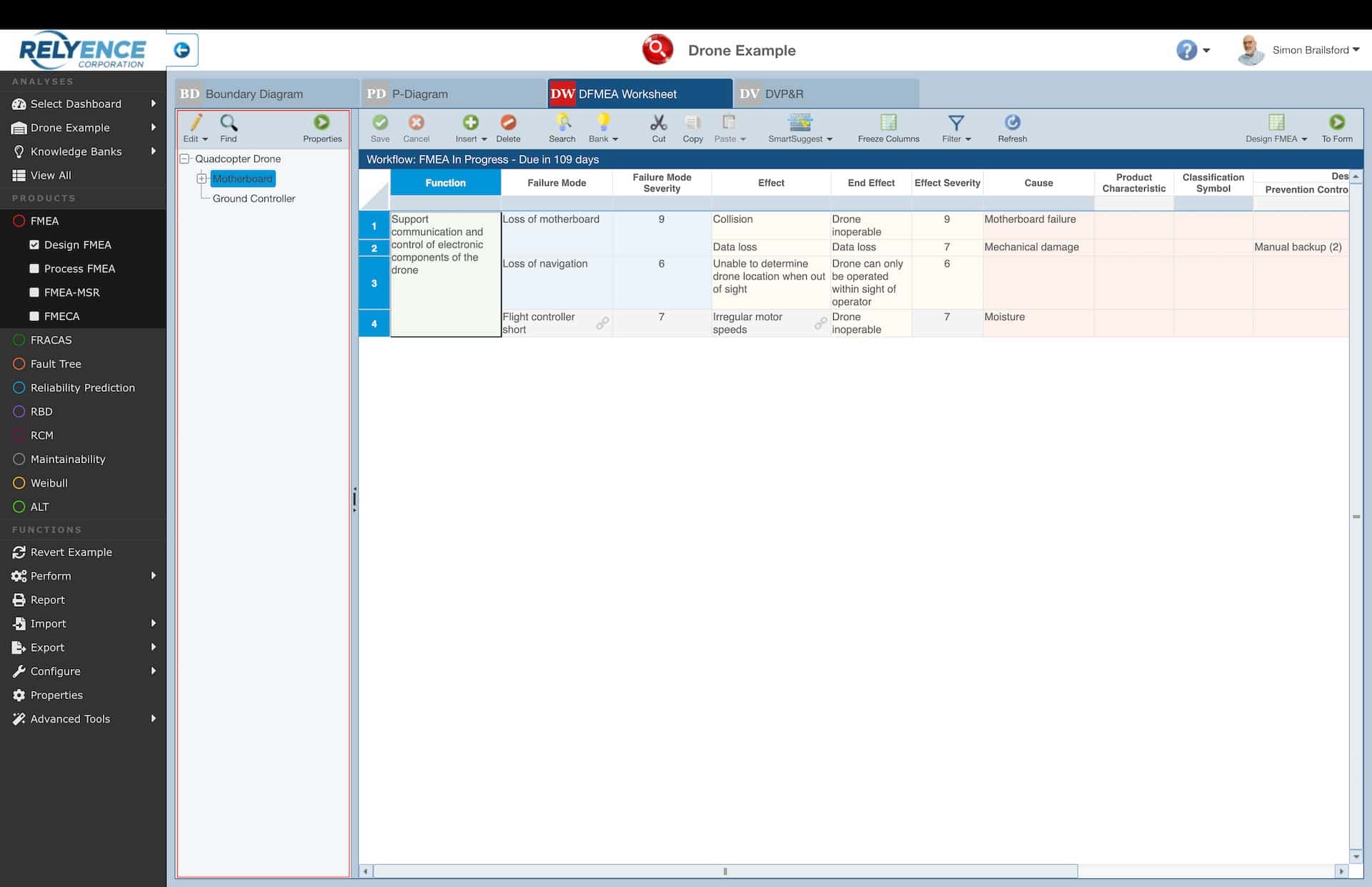
illustrative screenshot showing the Relyence analysis tree

Analysis Tree

The Analysis Tree, positioned between the Relyence Sidebar and main analysis area, provides a clear, hierarchical breakdown of your system, product, or process. While optional, it’s highly recommended for organising your analysis effectively.

As you select items in the Analysis Tree, the data displays the relevant filtered information, keeping your focus on the specific subsystem or section you’re working on. This intuitive filtering helps streamline data management across your Relyence modules, including FMEA, FRACAS, Reliability Prediction, RCM, and Maintainability Prediction.

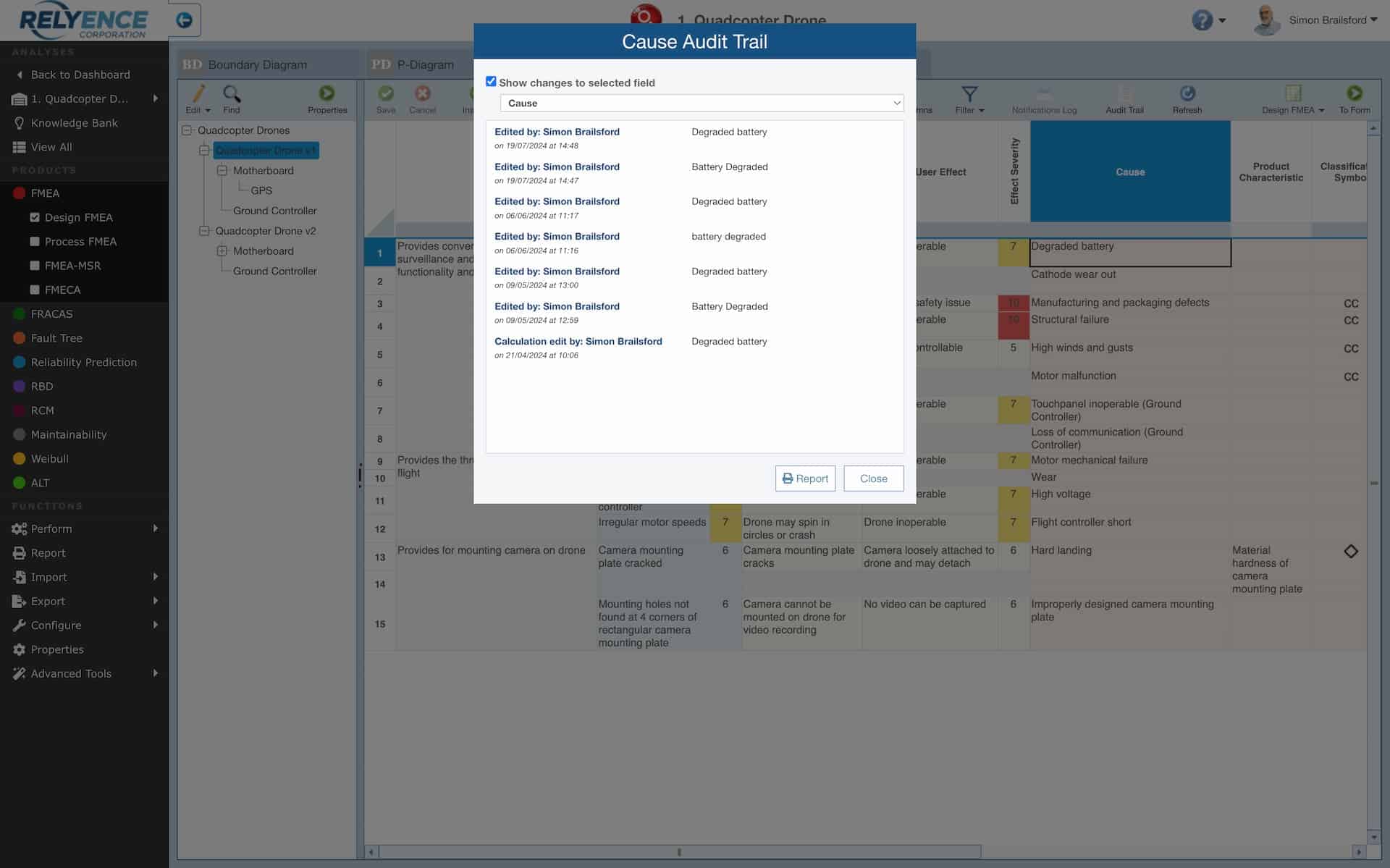
Screenshot shows the Relyence Audit Trail displaying the change history against a cause level cell data

Audit Trail

Relyence’s Audit Trail feature tracks all modifications to your data, including additions, edits, and deletions, along with who made the changes and when.

In the example shown, the Audit Trail for a Design FMEA shows detailed records of changes made to failure cause data—listing each update, who made it, previous values, and timestamps in descending order. For a comprehensive view, you can also export a full Audit Report, filtering by date and module for concise tracking.

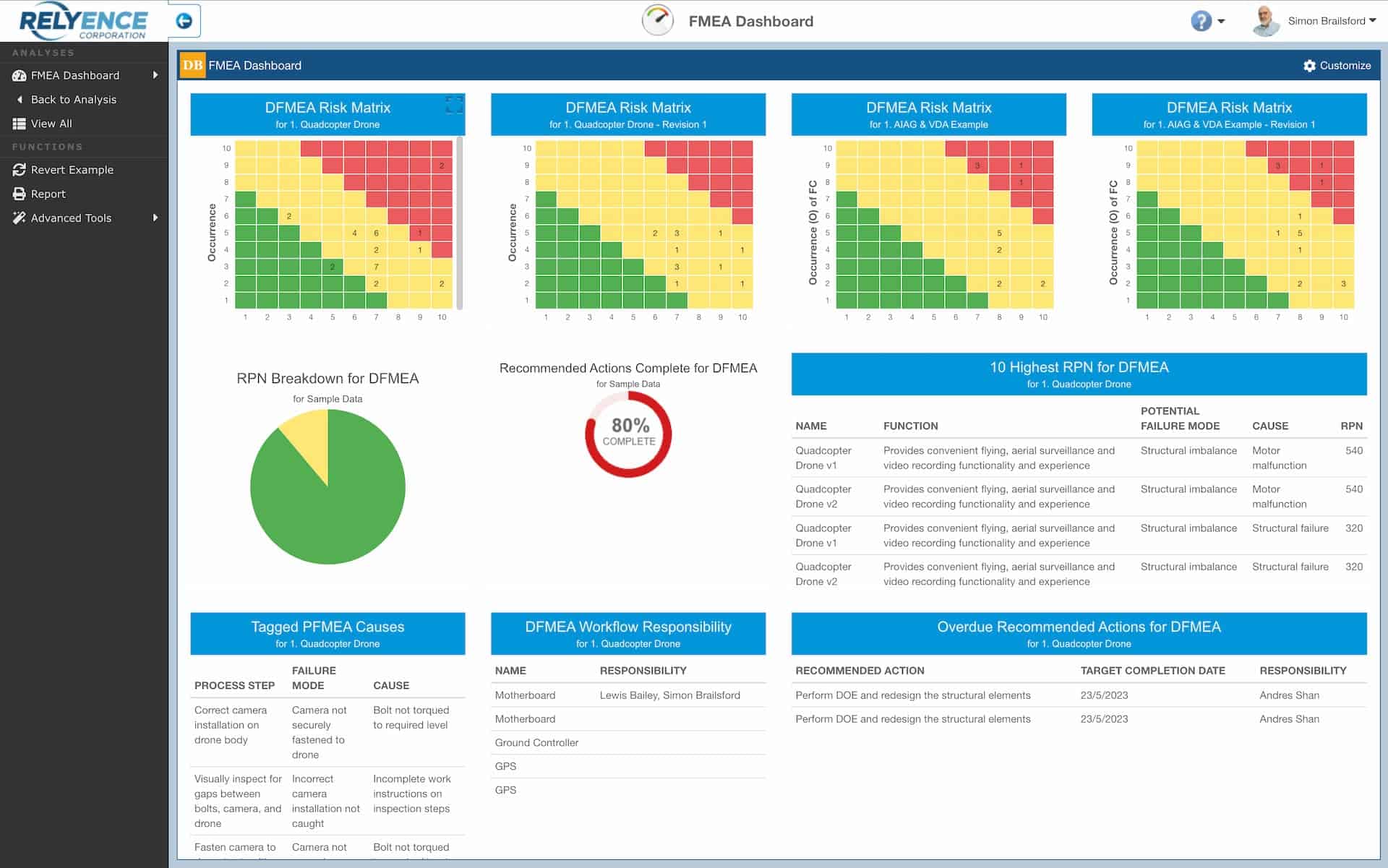
Screenshot showing an example Relyence Dashboard configured to show various DFMEA information

Customisable Dashboards & Drill‑down Reporting

Relyence Dashboards provide a comprehensive, customisable overview of your product or system by gathering and organising key data. Users can create unlimited, personalised Dashboards based on set permissions.

Using the Dashboard Editor, add widgets such as charts, tables, and graphs for high-level visual insights—many with drill-down features that lead directly to detailed analysis files, highlighting specific data for in-depth review.

Relyence FMEA-MSR Integrations

Our FMEA-MSR module shares data with the following Relyence products

RCM

Relyence RCM software helps you move from reactive fixes to proactive, data-driven maintenance strategies. With structured decision diagrams, analysing the outcomes of potential failure modes identified in Relyence FMEA. Seamlessly integrated with FMEA, Relyence RCM ensures your maintenance decisions are consistent, collaborative, and defensible—supporting reliability and safety across industries.

FRACAS

Relyence FRACAS software accelerates your reliability process with no-code customisations, allowing you to tailor failure reporting and corrective actions without IT support. It stands out by supporting industry standards such as 8D, DMAIC, and PDCA, as well as your own templates, and seamlessly connects with FMEA, Prediction, and Weibull tools to provide a single, unified reliability workflow.

FTA

Transform risk management with Relyence Fault Tree Analysis Software—your essential visual tool for reliability and safety. Build fault trees with a simple diagram editor, reuse events and trees through libraries, and migrate from Excel with ease. With built-in collaboration, reporting, and integrations to FMEA and FRACAS, Relyence FTA delivers a connected approach to managing reliability across your organisation.

Relyence FMEA-MSR Overview

Relyence FMEA-MSR software extends the standard FMEA methodology into the critical Monitoring and System Response (MSR) domain. Built around the AIAG & VDA guidelines, it helps ensure your systems can detect faults and respond safely in real-world conditions. The platform enables you to document monitoring strategies, system responses, and associated actions with complete traceability. Dashboards provide real-time visibility into detection and response measures, while Audit Trail and Revision features ensure compliance and accountability. Collaboration tools, including workflows, approvals, and notifications, support effective teamwork across functions, regardless of where your engineers are located.

Migrating from Excel is simple, with import and export options that preserve your data while unlocking new efficiencies. Integration with DFMEA and PFMEA ensures consistency, while links to FRACAS close the loop from failure detection through corrective action. Knowledge Banks and SmartSuggest promote reuse of proven approaches, improving consistency, and reducing duplication of effort. Browser-based access enables your teams to work anytime, anywhere, supported by robust governance and secure deployment options.

Relyence FMEA-MSR... is it the right choice for you?

NEXT STEPS

Register for our free, no obligation web based trial. No credit/debit card required, nothing to download/install. Or book a Zoom/Teams demo to find out more.